mpp-viewer
View & Export MPP Files via Open Source Java Library
View Microsoft Project Plan (MPP) Files in Read-Only Mode & Export to Excel via Open Source Java Application.
What is mpp-viewer?
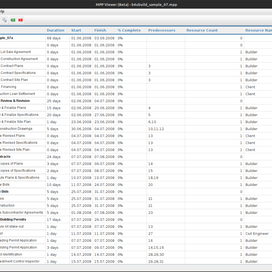
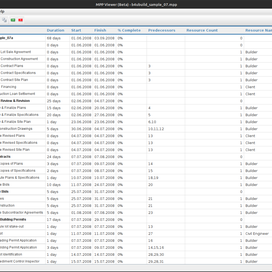
mpp-viewer is a free and open-source Java application designed to view Microsoft Project Plan (MPP) files in read-only mode. It provides a user-friendly interface similar to Microsoft Project and displays tasks in a hierarchical structure, including start/end dates, predecessors, and assigned resources. The tool supports MPP formats from 2007 through 2013 and automatically highlights completed or delayed tasks for quick visual analysis. It also enables users to search for specific tasks, copy task details, and associate .mpp files directly with the viewer for seamless workflow integration.
One of its key strengths is the ability to export MPP data into Excel (XLS/XLSX) files, making it ideal for reporting and sharing project data outside of Microsoft Project. Built entirely in Java, mpp-viewer is platform-independent and runs on any system with a compatible Java Runtime Environment. Its lightweight design and intuitive UI make it a practical alternative for teams needing quick access to project plan data without requiring expensive software licenses. With features like task highlighting, filtering, and text selection, mpp-viewer delivers essential project visibility with minimal overhead.
At A Glance
An overview of mpp-viewer features.
- View MPP files in read-only mode
- Hierarchical task display
- Task details (dates, predecessors)
- Resource assignment view
- Highlight completed/delayed tasks
- Search tasks by name or ID
mpp-viewer reads and exports Microsoft Project Plan files and supports common output formats.
Platform Independence
mpp-viewer is built using Java and runs on any system with Java 8 or higher.
.
Getting Started with mpp-viewer
mpp-viewer is a standalone Java application available on GitHub. You can download the latest release from the mpp-viewer GitHub repository, or build it from source using Maven. The project includes pre-built JAR files for immediate use. Simply download the JAR, ensure Java 8 or higher is installed, and run it with java -jar mpp-viewer.jar. No installation or configuration is required — making it ideal for quick project plan reviews on Windows, macOS, or Linux. Its lightweight footprint ensures fast startup and smooth performance even with large MPP files.
Run mpp-viewer via Java Command
java -jar mpp-viewer.jarView MPP Files with Full Task Hierarchy
mpp-viewer displays Microsoft Project tasks in a structured, hierarchical tree view, preserving the original WBS (Work Breakdown Structure) and parent-child relationships. Each task shows key details such as name, start date, end date, duration, % complete, and predecessor links. Resources assigned to tasks are also listed, giving users a comprehensive view of workload distribution. The interface mimics Microsoft Project’s familiar layout, reducing the learning curve for existing users. This makes it especially useful for project managers who need to quickly review project timelines and dependencies without opening the full Microsoft Project application.
How to Open and View an MPP File?
// mpp-viewer is launched via GUI; no code needed for basic viewing
// However, internally it uses MPXJ library to parse MPP files:
// net.sf.mpxj.reader.MPPReader reader = new MPPReader();
// ProjectFile project = reader.read(new File("project.mpp"));
Highlight Completed and Delayed Tasks
mpp-viewer automatically highlights tasks based on their status — completed tasks appear in green, while delayed (overdue) tasks are shown in red. This visual cue helps project managers quickly identify at-risk items and track progress at a glance. The highlighting logic uses the task’s % complete and actual finish date compared to the baseline schedule. Users can customize or toggle highlighting via the UI settings. This real-time status visualization enhances decision-making and status reporting, especially during project reviews or stakeholder meetings where quick insights are critical.
How to Enable Task Status Highlighting?
// Highlighting is handled internally by the UI renderer:
// if (task.getActualFinish() != null && task.getActualFinish().before(today)) {
//     style = Style.COMPLETED;
// } else if (task.getFinish().before(today) && task.getPercentComplete() < 100) {
//     style = Style.DELAYED;
// }
// No user code required — highlighting is automatic.
Export MPP Data to Excel
mpp-viewer includes a built-in export feature that converts MPP project data into Excel (XLS/XLSX) format. This is invaluable for sharing project timelines with stakeholders who don’t have access to Microsoft Project. The export preserves key fields like task name, dates, duration, resources, and predecessors in a structured spreadsheet layout. Users can select specific tasks or export the entire project. The resulting Excel file is ready for further analysis, reporting, or integration into other tools like Power BI or Excel PivotTables — making mpp-viewer a powerful bridge between enterprise project planning and business intelligence workflows.
How to Export MPP to Excel?
// Export is triggered via UI menu: File → Export → Excel
// Internally, Apache POI is used:
// Workbook workbook = new XSSFWorkbook();
// Sheet sheet = workbook.createSheet("Tasks");
// // Write header and task rows...
// try (FileOutputStream fos = new FileOutputStream("export.xlsx")) {
//     workbook.write(fos);
// }
Search and Copy Task Information
mpp-viewer provides a fast search bar to locate tasks by name, ID, or resource — ideal for large projects with hundreds of tasks. Results are highlighted in the task list, and users can click to jump directly to the task. Additionally, you can select and copy any task detail (e.g., dates, predecessors, notes) to the clipboard for use in emails, reports, or documentation. This eliminates manual retyping and reduces errors. The combination of search and copy functionality significantly improves productivity during project audits, status updates, or cross-team coordination.
How to Search and Copy Task Details?
// Search is handled via UI input field:
// List results = project.getTasks().stream()
//     .filter(t -> t.getName().toLowerCase().contains(query))
//     .collect(Collectors.toList());
// Copy uses standard Java Toolkit:
// Toolkit.getDefaultToolkit().getSystemClipboard()
//     .setContents(new StringSelection(task.getName()), null);